
Financial Hub (Beta)
Table of contents
Benefits
The Financial Hub allows you to track your income and expenses year-round, which will then make tax time easier. TaxAct has partnered with Plaid to import transaction information from your connected accounts.
Using the Financial Hub, you can see your income, expenses, and transactions for all connected accounts in one place. You can also store your tax documents in the Financial Hub, so they will be ready for tax time.
Initial Setup
To begin using the Financial Hub, follow these steps:
- From your My Account dashboard, click Get started beside the Financial Hub icon.
- Click Get Started and follow the prompts to enter your name and build your financial profile.
- Follow the prompts to connect your bank or financial institution accounts using Plaid.
- The exact steps may vary depending on your bank or financial institution and whether you have previously used Plaid.
- Once you have connected all accounts, the Financial Hub dashboard is displayed showing any remaining steps that you need to take to complete your financial profile.
- Scroll down to see a breakdown of income and expenses based on the accounts that you imported. You may need to categorize your transactions to see more detailed expense information and charts.
Dashboard
The dashboard shows your financial information with detailed and color-coded charts of your income and expenses. Toggle between the last 6 months or Year to date to gain insight into your finances.
Transactions Tab
The Transactions tab allows you to view and organize your transactions for the tax year.
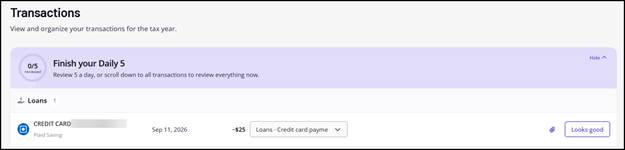
For each transaction, select the applicable income/expense category from the drop list, then click Looks good. You can also click the paperclip icon to upload a relevant receipt for your records.
If the transaction was automatically categorized, you can simply click Looks Good to verify that you have reviewed it. This ensures that it will be accurately displayed on your dashboard reports.
Documents Tab
The Documents tab shows any forms that you have already uploaded. You can review and organize these documents so that you are ready for tax season. You can drag and drop files or browse and upload them from your computer or device to ensure that all your tax documents are ready for the tax year.
Financial Profiles Tab
On the Financial Profiles tab, you can see and organize your financial activity by individual person or business. This is helpful if you are married, share an account with someone else, or have both personal and business expenses that need to be tracked. You can also add or delete financial providers or assign accounts to a person or business on this tab.
An account can be assigned to more than one profile if it is shared.
Beta
Financial Hub is in beta and may contain errors, change, or be interrupted or discontinued. You are responsible for reviewing information for accuracy. No charge during beta, but continued access may require payment.